Wednesday, April 19, 2023

Why Bitcoin Needs to Go to Zero: A Comprehensive Look at its Negative Impact

 I wanted to play with ChatGPT and have it create a blog post.  Here is my its first creation with some input/guidance from myself.


Bitcoin has been touted as a revolutionary technology that can transform the way we store and transfer value. However, there are numerous reasons why it needs to go to zero. While the underlying technology behind Bitcoin, known as blockchain, is genuinely innovative and potentially transformative, the issue with Bitcoin is that it is a bad use case for this technology. In this blog post, we will examine the various reasons why Bitcoin needs to go to zero and why blockchain technology should be used in more responsible and sustainable ways.

1. Environmental Damage

The process of mining Bitcoin is incredibly energy-intensive, consuming vast amounts of electricity and contributing to climate change. This high energy consumption is a significant problem, with studies showing that Bitcoin's energy usage is equivalent to that of a small country. The environmental damage caused by Bitcoin mining is already apparent and is set to become more severe unless we take action. Bitcoin mining in China alone could produce enough greenhouse gas emissions to raise the country's temperature by 2 degrees Celsius by 2033.

2. Facilitation of Illegal Activities

Bitcoin is often associated with illegal activities such as money laundering, drug trafficking, and terrorism financing. Its anonymity and lack of regulation make it an attractive option for criminals looking to evade detection and launder money. The prevalence of illegal activities associated with Bitcoin means that it poses a significant threat to global security.

3. High Volatility

Bitcoin's high volatility makes it a risky investment option, with prices fluctuating wildly over short periods. This volatility not only makes it difficult to predict the value of Bitcoin but also increases the risk of financial losses. Bitcoin's volatility can lead to financial instability, making it a significant threat to the global economy.

4. Lack of Regulation

Bitcoin operates outside of traditional financial systems, making it difficult to regulate effectively. This lack of regulation has led to numerous frauds and scams in the Bitcoin market, resulting in significant financial losses for individuals. Bitcoin's lack of regulation also makes it challenging to prevent illegal activities associated with it.

5. Harming Societal Well-being

Bitcoin's high energy consumption, illegal activities, financial instability, and lack of regulation are all factors that can harm societal well-being. The damage caused by Bitcoin extends beyond financial losses and environmental degradation, creating a world where criminal activities are facilitated, and financial instability is rampant.

It is important to note that the underlying technology behind Bitcoin, blockchain, is a genuinely innovative and potentially transformative technology. Blockchain has the potential to revolutionize a range of industries, from finance to healthcare, by providing a secure, transparent, and decentralized way to store and transfer data.

However, the issue with Bitcoin is that it is a bad use case for this technology. While the idea of a decentralized currency that operates outside of traditional financial systems is certainly compelling, the reality is that Bitcoin has become a vehicle for speculation and illegal activities, rather than a useful currency or payment system. This has resulted in the negative consequences mentioned earlier, such as environmental damage, financial instability, and harm to societal well-being.

In conclusion, while blockchain technology has tremendous potential, Bitcoin is a bad implementation of it. It is time for us to recognize the shortcomings of Bitcoin and focus our efforts on finding more responsible and sustainable applications of blockchain technology. By doing so, we can ensure that the benefits of blockchain are realized while mitigating the negative consequences associated with Bitcoin. It is time for Bitcoin to go to zero, and for us to move on to more viable and sustainable uses of blockchain technology.

Friday, August 19, 2022

Virtual Transparent Firewall not working

I have been successfully using a pfSense community edition firewall to protect my home test lab.  My local ISP delivers me a subnet of addresses directly so I need to leverage a transparent firewall or "bridge" to protect the lab.  After rebuilding a few pieces of the lab I restored my pfSense configuration to a new host/VM and found that no traffic was passing.  I did a packet capture and did not see any communication traffic.  I thought that *something* must be blocking the traffic before it gets to the pfSense transparent firewall VM.  A lightbulb went off in my head back to my VMware architecture days about the 3 security settings you can set on a virtual network switch, promiscuous mode being the easiest to remember.  I played with turning these on/off 1 by 1 and found I needed both Promiscuous mode and Forged transmits security turned off (Setting to Accept) for this pfSense transparent firewall VM to operate correctly.  Obviously turning these features off does open your ESX Host up to accepting more (possibly malicious) packets, but the ESX host is simply passing the packets along to the VM(s) attached to that Network on the host.  You can limit your exposure by only having a single VM on that host's "raw internet" network and a  single (same) VM attached to the inside "filtered internet" network.   Assuming you trust pfSense to do its job, turning off these features should work for most home use cases.


Thursday, February 3, 2022

yum update failing on Google Cloud VM

 I use google cloud's smallest VM for hosting my own DNS servers.  I use the f1-micro instances that are very limited in memory and cpu, but cheap!

During a regular yum update I received the following error and my instance (VM) failed to reboot.

During the Cleanup part of yum update the google-cloud-sdk gave me this error:

/var/tmp/rpm-tpm.rdz2f9: line 4: 11963 Killed gcloud components post-process --force-recomplile warning: %postrun(google-cloud-sdk-360.0.0-1.x86_64) scriptlet failed, exit status 137 Non-fatal POSTUN scriptlet failure in rpm package google-cloud-sdk-360.0.0-1.x86_64

I read on this post - https://stackoverflow.com/questions/40163733/upgrading-google-cloud-sdk-fails-on-configure that this person had the same issue to due using the smallest GCP instance size, but they chose to stop some processes to free up memory before they did an update.

My resolution was to first build a new VM with a previous snapshot of the VM before it was messed up by the update.

Just for good measure I did some yum cleanup with yum-utils before anything else, then update the single google-cloud-sdk, before updating the rest without error.

sudo yum install yum-utils

sudo package-cleanup --dupes --noplugins

sudo yum clean all

sudo yum clean dbcache (probably redundant)

sudo yum update google-cloud-sdk (this took a long time)

sudo yum update (update all the other pieces)

After this everything was happy!


Wednesday, May 5, 2021

How to setup DNS forwarding for specific domains (i.e. home.lab)


I recently purchased a USG-3P (Unified Secure Gateway) Ubiquiti Unify Home router.

With its DHCP, everything points to this device as the DNS server for the house.  I like this because I don't want to depend on my home lab being up for DNS (Internet) to be working for basic name resolution.  However, I want my xyz.home.lab domains to resolve.  I did a bunch of googling and found I needed to modify the config.gateway.json file, but I couldn't find it on the appliance.  I then found this article, so I just needed to SSH into my USG and run a command such as ---  

set service dns forwarding options server=/lab.dns/172.16.1.10

This seemed great, but the command gave me “invalid command”, which it turns out you need to go into configure mode first on the USG,  just type ‘configure’ and hit enter and then run the command above.  After that you type commit, then save. 

This almost makes my home work, but my primary mac machine is always VPN’d into work, and all DNS requests are sent there, so my home.lab still doesn’t work from this machine.

On my mac I needed to mkdir /etc/resolver, then in the /etc/resolver directory, then create a file named home.lab

Adding the following lines ----

nameserver 172.16.1.10

nameserver 172.16.1.11

After I saved that, I can now resolve my home.lab dns from everywhere, and I get the bonus of being able to still work just fine if the lab (DNS) is down.

Thursday, April 29, 2021

Team Rules

 I dug this up from many years ago, just as good today as it was then!


Team Rules - by Brian Smith

  1. It's all about the customers! We must provide a reliable and cost effective solution!
  2. If there are customers on it, then it is in production and will be treated as production until the customers are off and it is NOT in production.
  3. You can't say that's not my job, you may direct someone to the appropriate person or group if you can’t help them.
  4. All Negative customer experiences must be escalated, no matter who you believe is responsible
  5. If a project deadline is in jeopardy, you must escalate immediately.
  6. There is no excuse use official methods (i.e. Open an Incident in the official ticketing tool)
  7. When you are on call, you must be available to work on an issue.
  8. Document before you execute and open a change for all changes (use official tools)
  9. Do your best to not directly delete anything, take offline for 3-7 days when possible

Wednesday, March 24, 2021

SRE BUZZWORD BINGO

 ok, it's not bingo, but it is a crossword

https://crosswordlabs.com/view/sre-buzzword 

Enjoy!

What does SRE commonly do, the five principals of SRE

 Here are some slides I've presented at a number of places people have asked me to post.


Lastly i'd like to add that "Self Correcting Systems" are vital to the success of SRE.  Of course we all hear about auto-remediation or self-healing technologies.  While those are self evident I personally recommend you think about your people and processes.  Think about the motivations, rewards and expected human behaviors.  If you focus on a target of reducing false monitoring alarms, someone MIGHT decide to just disable the alarms instead of fixing them.  If you focus on auto-healing too much, you may miss the fact that most things that can/should be fixed by auto-healing is a design flaw/problem.  Unfortunately we tend to ask how many fires we put out, not how many fires we prevented because "fires put out" is easier to count.  We have to educate our stakeholders and leadership to learn that an ounce of prevention is worth a pound of cure!

Wednesday, September 30, 2020

What is SRE

SRE is an abbreviation for Service Reliability Engineering, also known as Site Reliability Engineering.  SRE can also be a job description for a Service(or Site) Reliability Engineer.  DevOps is a methodology (and should never be someones title) where a developer supports the code they write in production.

Service Reliability Engineering exists to improve reliability of services by writing software to keep a service functioning properly and to drive the improvement through feedback primarily around reliability, availability, observability & serviceability.  SREs are also expected to do a significant amount of troubleshooting to find the root cause of an issue and not focus on the symptoms.  SRE's often help Developers with Infrastructure, Deployment, Configuration, Monitoring & Metrics to make their software easy to update, manage and monitor.

SRE is a set of practices, metrics, and prescriptive ways to ensure reliability and uniformity to enable success at scale.

SRE is often a Gate to Production (grant access, make/approve/authorize production changes)

Characteristics of an SRE

  • Reliability
    • Focused heavily on meeting SLO's & SLA's
    • Error budgets are like money, they are meant to be spent, wisely as it is limited, underspending and overspending are both bad
    • Embraces fact that failures will happen, plans for them
    • Solve production issues and restore service
    • Actively participate in postmortems
    • Has a roadmap and prioritized backlog of things to automate
    • SRE's is at war with 
      • toil (anything repetitive that is done by hand should be automated)
      • inconsistencies (snowflakes are a killer)
      • ignorance (visibility & data are key to managing things quickly at scale)
    • Improves monitoring with alert correlation to reduce noise and TTR (time to repair)
    • SRE's mandate is to continually push for product improvements
  • Automation/Code
    • Minimally spends 51% of their time solving issues through code
    • All Incidents and Escalations should result in a runbook/workflow that eventually turns into automation (I like to call runbooks human-automation)
    • CI/CD Automation platforms to push out new code and fixes
    • Many small code pushes are far better and easier to backtrack than fewer large ones
    • No Production software pushes on Friday or the weekend
    • Knows you can't test everything, unit tests are required, but things will collide in production
    • Automation platform such as stackstorm to orchestrate fixes
    • Write tools such as auto-triage for troubleshooting (gather the logs while the engineer logs in)
    • Idempotent actions are your new best friend 
  • People & Process
    • SRE's need psychological safety, one example is blameless postmortems
    • SRE's is a cognitively difficult task, requires minimal context switching
    • Participates in on-call rotation
    • If SRE's support a platform they do not develop entirely, they must be involved in project planning and execution with those teams.
    • SRE's need time to dig into incidents to not only fix, but to find root cause and take preventative measures
  • Tooling for success
    • SRE's need proper tooling, such as logs, time-series metrics, traces, etc.. (it's virtually impossible to understand true root cause for intermittent issues if you don't have this.)
    • Proper monitoring to detect failures, need to feel confident that if no alarms are triggering that the infrastructure is healthy, customers should not be the ones to tell you that you have a problem.
    • Never create an alarm unless it leads to an action.  Warnings are useless at scale.
SRE Shared Vocabulary (my definitions, feel free to disagree)
  • Black Box Monitoring- All you know are the inputs and outputs, if wood goes in, and chairs comes out, thumbs up, things are good.  If chairs come out broken, incomplete or not at all, you realize you have a problem.
  • White Box Monitoring - (I wish it was called transparent box) but this is where you know what's happening inside the machine.  You see the first machine wood get cut, the second sand it, the third assemble the parts and the fourth paint the chair.  You know which part of the machine is not functioning properly.
  • Observability - You need to make your production observable, you need to expose signals we can watch programmatically in order for the operators to understand the health of the machine.
  • Serviceability - How easy/difficult is it to maintain this software, to get new software into production or upgrade to a new build.
  • Availability - Frequency of a system to operate properly or at least within a(n) SLO/SLA
  • Idempotent - Something that can be applied repeatedly safely and will only make a change the first time it applies.
  • Immutable - Something that can't be changed after it is built/created.
  • Heuristic - an approach to solving a problem that uses practical methods but may not be optimal, but it will get you there.
  • Orthogonal - When something changes, but does so independently and does not affect the other.
  • Chaos Engineering - Intentionally breaking things in production to test your resiliency
  • Canary - Something built to test new features or configurations, or possibly a  very small subset of production.  This way you can find issues with limited scope of impact.
Probably the biggest key to success for SRE & DevOps is the right mindset.  The business must see SRE as a trusted partner who's preventing issues and keeping the service running properly.  If SRE is running a production environment where they do not write all of the software, then developers sometimes think of them as operations people that they can toss software "over the fence to".  While SRE is fantastic at remediating issues at scale with automation, developers need to still be accountable to the code they write and maintain responsibility for improving that code.

Friday, April 10, 2020

WD Red Price Per GB April 2020

If you are like me, you do this exercise every time you need to buy a new drive.

I always try to remember what it used to cost, so I'm just going to start posting them here.

WD RED
TB SizePrice Cost per GB 
1 $       61.27 $         61.27
2 $       78.92 $         39.46
3 $       96.99 $         32.33
4 $     101.99 $         25.50
6 $     156.49 $         26.08
8 $     224.99 $         28.12
10 $     300.00 $         30.00
12 $     357.93 $         29.83
14 $     462.90 $         33.06

Friday, May 3, 2019

Blogs on VMware site

Recently, most of my blogging has been directly on VMware site.

I thought i'd link you to a couple of the more popular ones here.

Embracing a DevOps Mindset, this is all about leading a team through a cultural transformation
https://blogs.vmware.com/vov/2018/07/25/embracing-a-devops-mindset-in-vmware-it-cloud-operations/

Are we ready?, a post about how VMware makes sure its SaaS services are ready for primetime!
https://blogs.vmware.com/vov/2018/12/18/9374/

VMware's private cloud team Represented at VMworld.
https://blogs.vmware.com/vmworld-archive-07-25-2017/2016/07/vmware-and-the-private-cloud-at-vmworld-2016.html

Thursday, August 23, 2018

Troubleshooting 101


Think of yourself as a doctor, but for computers.  Start with "DO NO HARM" as your credo.  Don't make things worse, snapshots, GO SLOWLY, think before taking any action, ask for a double check.
There are two basic approaches to troubleshooting: the stab-in-the-dark approach and the systematic approach. The stab-in-the-dark approach usually involves little knowledge of the technology involved and is completely random in nature. A systematic approach, on the other hand, involves a step-by-step approach and requires in-depth knowledge of the technology.
1) When did it start? (almost always change related, planned or unplanned)
     Find an error message, try finding the starting time in the logs
2) Isolate, isolate, isolate.
  How can I split this complex problem into several smaller problems.  Packets go from A to Z, but don't arrive, 
First divide the problem in half, check if packet makes it from A-M, if it does, then check M-Z.
If you see it didn't make it form M-Z, half it again, check M-T, then T-Z, then again, keep dividing in half.
3) the WORST problems to troubleshoot are always two things, that agitate each other.
Sometimes you have one problem, that due to redundancy, or other reasons, you don't even KNOW you have had for months.
Then another thing breaks, suddenly you have a bizarre scenario that just doesn't add up.
4) Check the health of EVERYTHING
Log into switches, servers, (consoles people) often errors don't show up in logs, but you'll see them sitting right in of you.
5) Get creative, approach the problem from different angles, ask for help, a second point of view or skillset can really help.   Go play foosball, step back for 20 minutes and refresh your mind.

More Advice:
Look for workarounds, or multiple paths to restore service.
If you have a known method to restore, but it may take hours or days, then try to work both paths in parallel

Saturday, March 19, 2016

Netgear VLAN & PVID making me doubt my sanity

Rebuilding my home lab tonight, I got stuck because every time I plugged a cable into my switch, everything died.


I came to realize that the reason for my problems was the fact I had been moving cables around in my Netgear GS748T v5 switch and even though it seemed like the VLANs configs were correct, somehow my old PVID (Advanced-Port PVID Configuration) settings were messing things up.  The scenario I have is 4 ESX hosts, one Synology array, plus one Internet link.  I have four VLANS, 1=Default/home network, 10=iSCSI, 20=Internet, 30=VSAN traffic.  I just upgraded my hosts to the Intel NUC's (because I want to be like William Lam),  These Intel NUC's can only use the 1 onboard NIC with vSphere 6.0 U2 right now, hopefully someone will integrate a USB nic driver soon.  So back to my challenge, the ESX hosts can ride on the default network and use VLAN tagging for access to the other 3 networks. My internet connection is a dumb device that can't use VLAN tagging, so I needed to find a way of integrating it.  Normally that would just be an untagged port, but that doesn't work on these Netgear Switches.  In order to get that to work I had to setup PVID, I used port g1 for Internet and g48 for iSCSI, and g39-42 for the ESXi hosts.  The key here is that in the PVID settings, the port must be a Member of the VLAN, but not Tagged.

That seems to be working well.  From the VLAN membership tab, I left my default VLAN (1) everywhere but the two untagged ports I will need my storage and internet connected to.  For the other 3 VLANs I mostly emptied it out and set it up like this:

If you have a similar setup and you get stuck, I hope this helps you!

Monday, December 9, 2013

VMware vSAN IOPS testing

Take this with a grain of sand, these are only initial figures.  I am using a combination of IOMeter for Windows and fio for Linux.

Baseline redundancy and caching, no storage profiles used, only using vSAN as a datastore (I’ll do the other options later)

My vSAN is made of 3 identical ESXi hosts, with a single SSD Samsung 840 250GB, and two Seagate 750GB SATA drives. vSAN has a dedicated single 1GB connection, no jumbo frames used. (yes there could be bottlenecks at several spots, I haven’t dug that deeply, this is just a ‘first pass’ test)

The end result of this VERY BASIC test is this:

vSAN random reads were an average of 31 times faster than a single SATA disk

vSAN random writes were an average 9.1 times faster than a single SATA disk


More Details Below:

Regular single disk performance (just for a baseline before I begin vSAN testing)

Random Read (16k block size)

first test = 79 IOPS

second test = 79 IOPS

Random Write (16k block size)

first test = 127 IOPS

second test = 123 IOPS

vSAN disk performance with same VM vMotion to the vSAN

Random Read (16k block size)

first test = 2440 IOPS

second test = 2472 IOPS

Random Write (16k block size)

first test 1126 IOPS

second test 1158 IOPS

Commands used in fio:

sudo fio --directory=/mnt/volume --name fio_test --direct=1 --rw=randread --bs=16k --size=1G --numjobs=3 --time_based --runtime=120 —-group_reporting

sudo fio --directory=/mnt/volume --name fio_test --direct=1 --rw=randwrite --bs=16k --size=1G --numjobs=3 --time_based --runtime=120 —-group_reporting

I mentioned I did use IOMeter in windows, the initial results were very similar to the fio results above.  I will post those once I have the time try each solution and go deeper into identifying bottlenecks and getting more detailed, adding more hosts, etc…

Sunday, December 8, 2013

VMware vSphere 5.5 vSAN beta ineligable disks

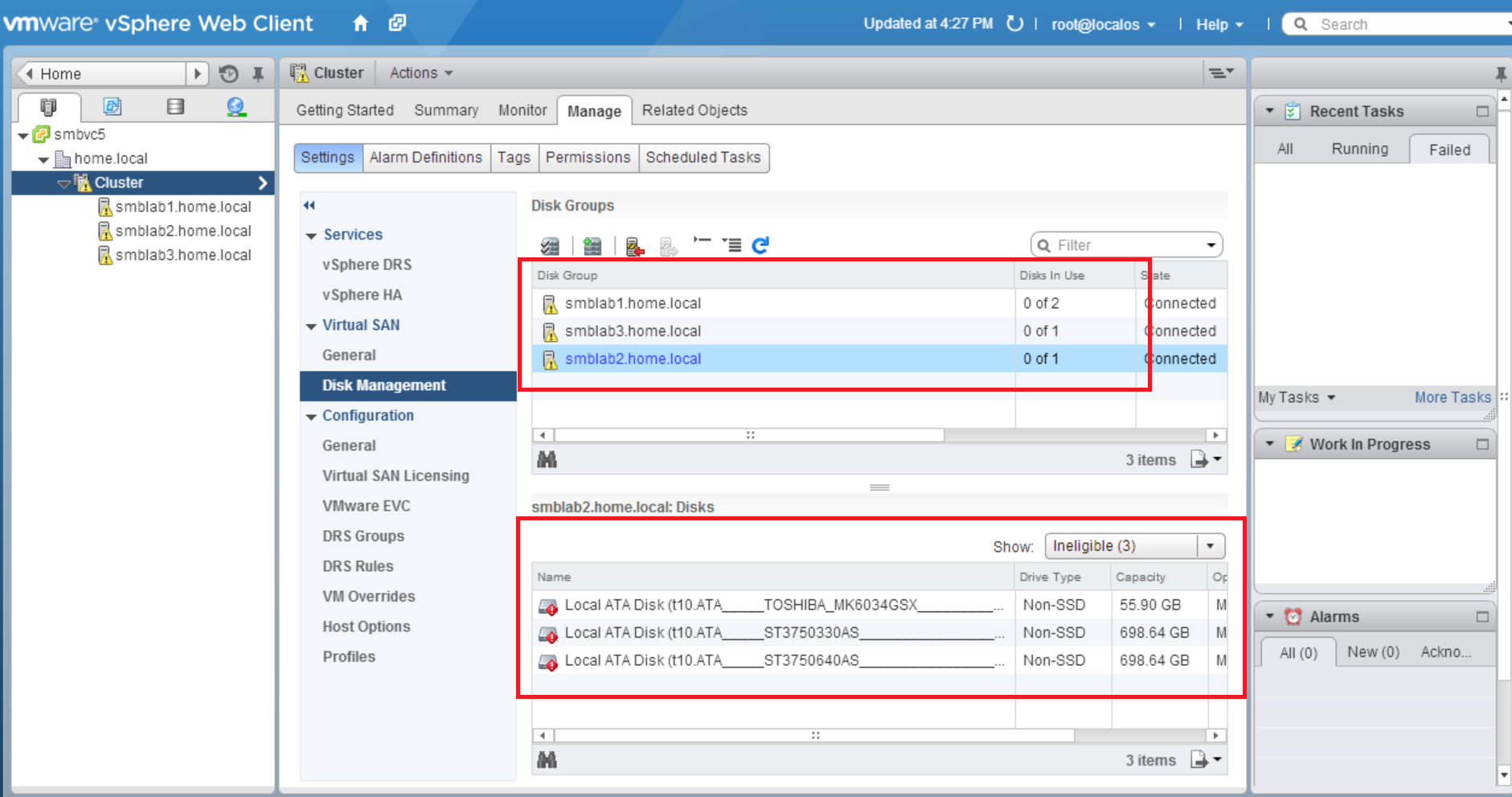
While building my home lab to use vSAN and NSX following Cormac Hogans's great instructions, I've encountered an issue that the disk I am trying to use for vSAN are not showing as available. In the "Cluster/Manage/Virtual SAN/Disk Management" under Disk Groups, I see only one of my 3 hosts has 0/2 disks in use, the others show 0/1. My setup is this, I purchased 3 new 250GB Samsung SSD drives (one for each host), and am trying to re-use 6 older Seagate 750GB SATA drives. My first thought, is why does it only say 0/1 in use on two of the servers?  I have 4 drives in that server, a 60GB boot drive, 1 SSD, & 2 SATA drives, so why doesn't it say 0/3 or 0/4? I noticed in the bottom pane, I can choose to show ineligable drives, there I see the 3 drives I can't use. I understand why I can't use my Toshiba boot drive, but why do my 750GB Seagate drives also show Ineligable?


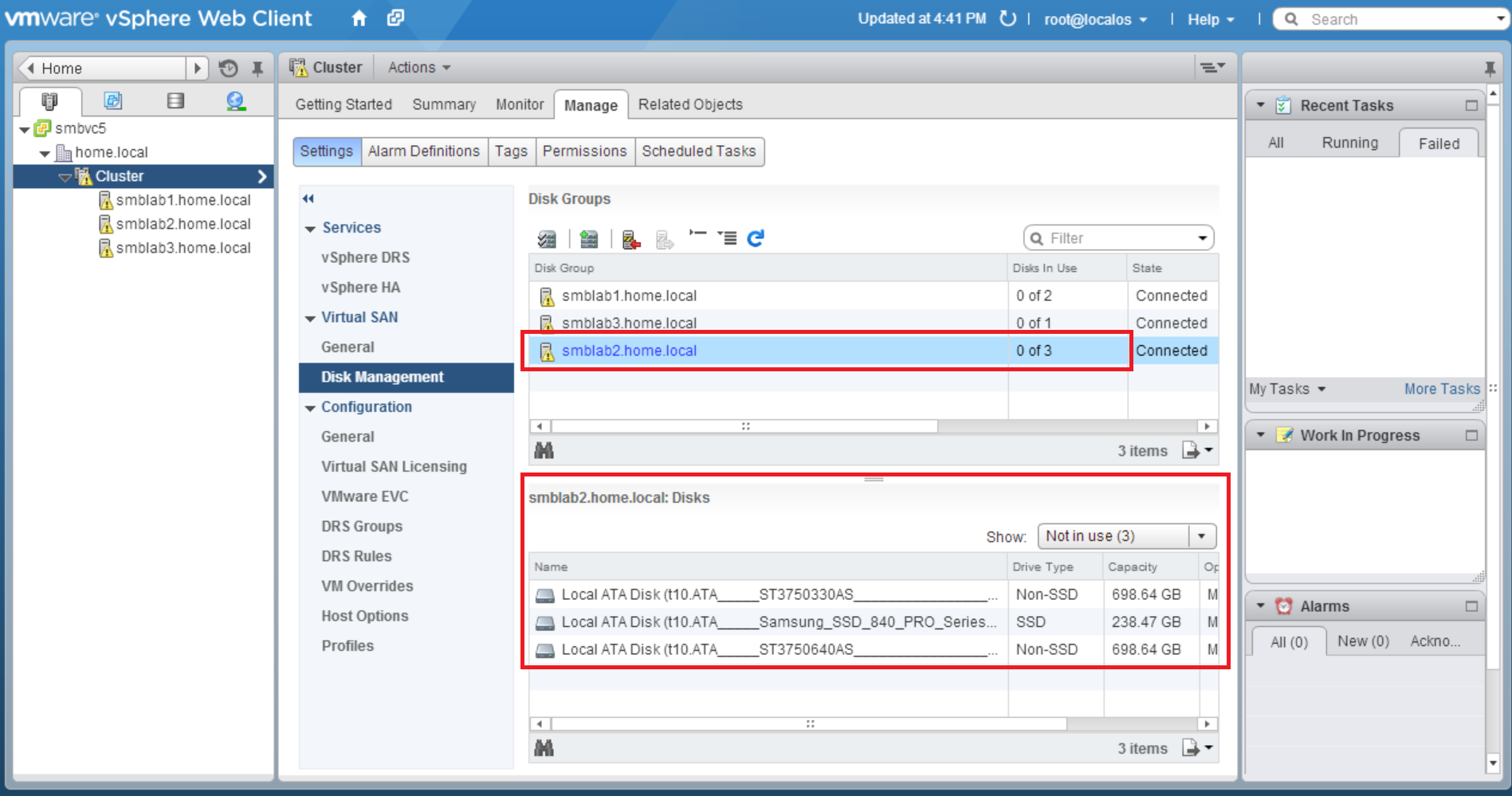
I played with enabling AHCI, but knowing there is a bug in the beta I wanted to avoid it. See here: http://blogs.vmware.com/vsphere/2013/09/vsan-and-storage-controllers.html. This unfortunately did not change the situation. I finally realized that possibly those drives still had a legacy partition on them. After nuking the partitions on those drives, the disk now show up as eligable drives. I tried this first on my server smblab2, and you see that 0/3 are not in use, which is what I would have expected originally.  Not in use in this context basically means "eligable".


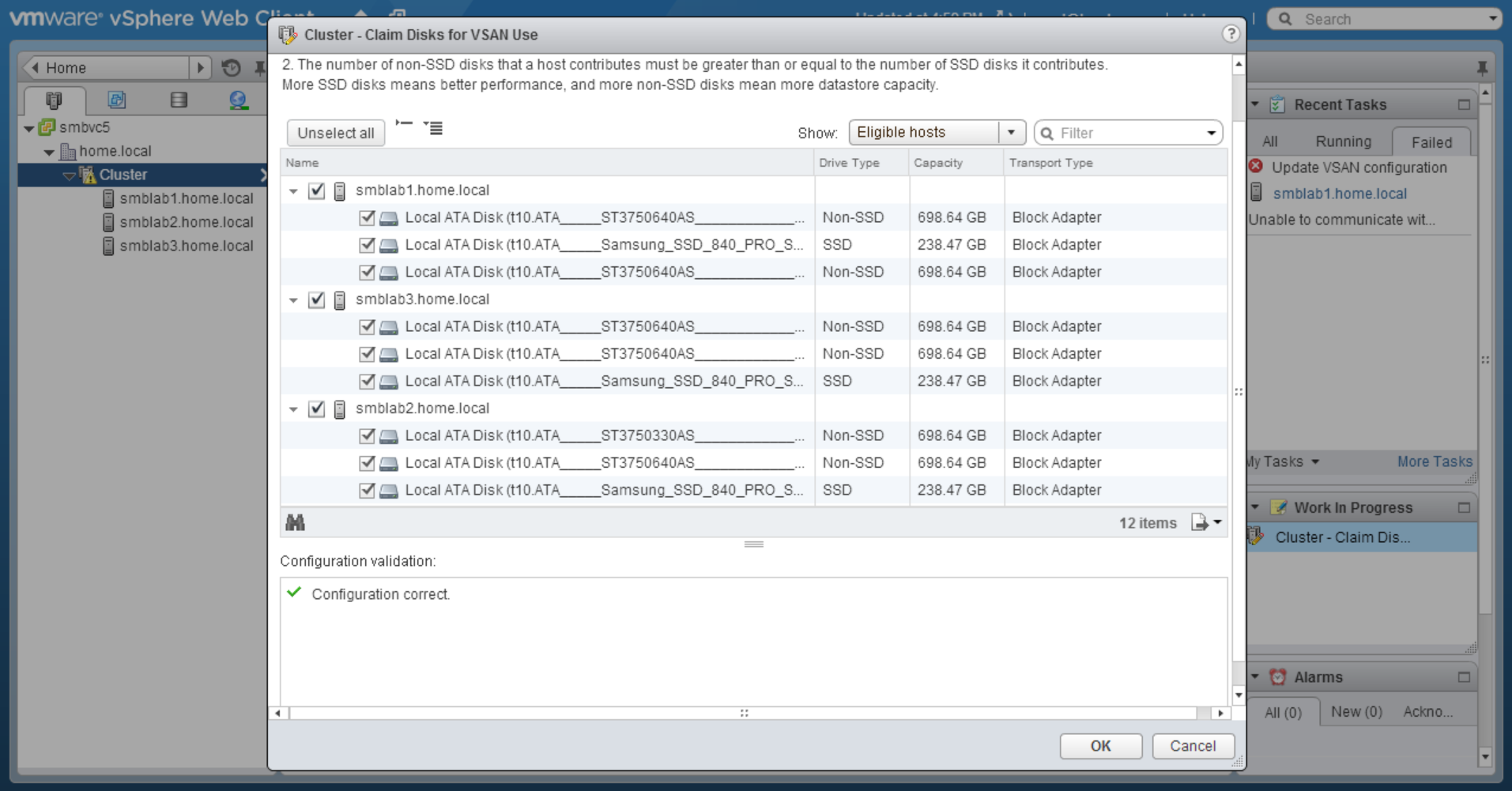
I was then able to Claim the disks for VSAN Use:


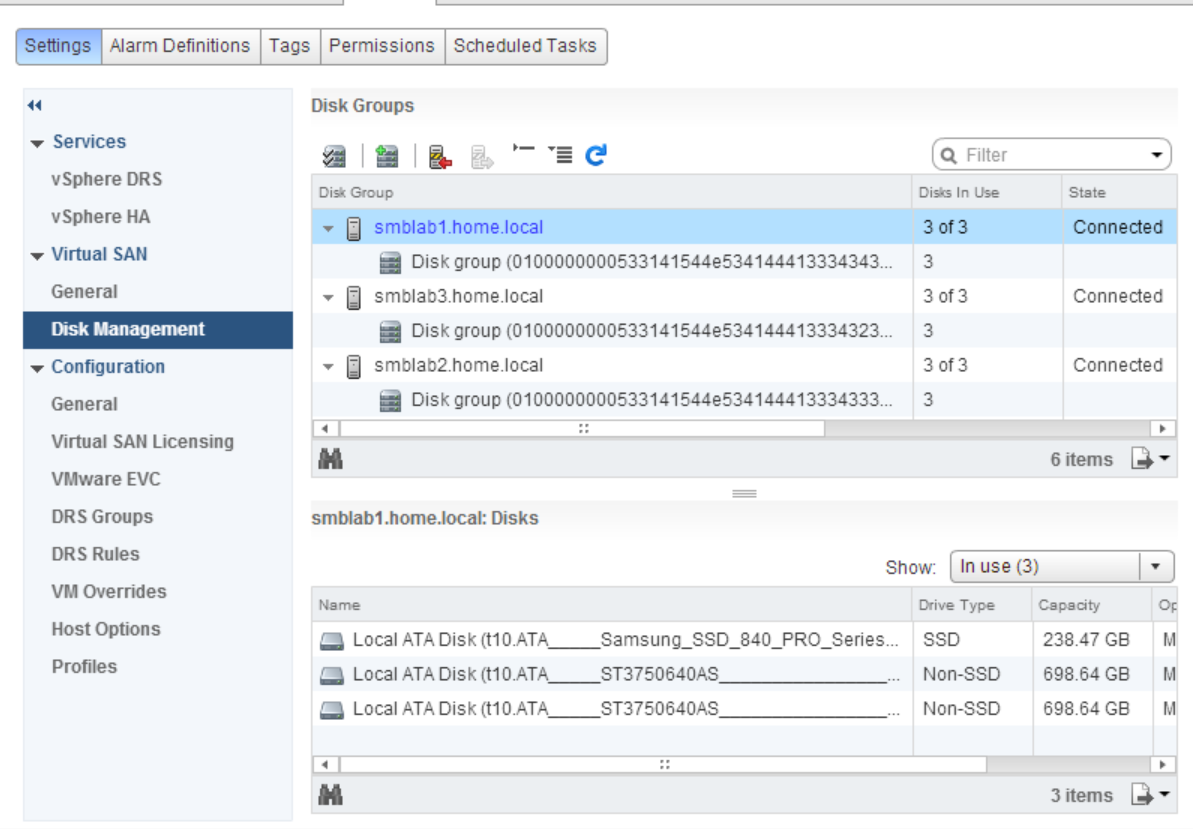
Then finally create the disk groups.


Many others suggest running vSAN in a Virtual environment, which is great for learning, you can even get the experience doing the Hands on Labs (Free 24/7 Now!), but I wanted to do some performance testing, and for that I needed a physical environment. Now that I've gotten past my little problem, it's working great!

Monday, November 25, 2013

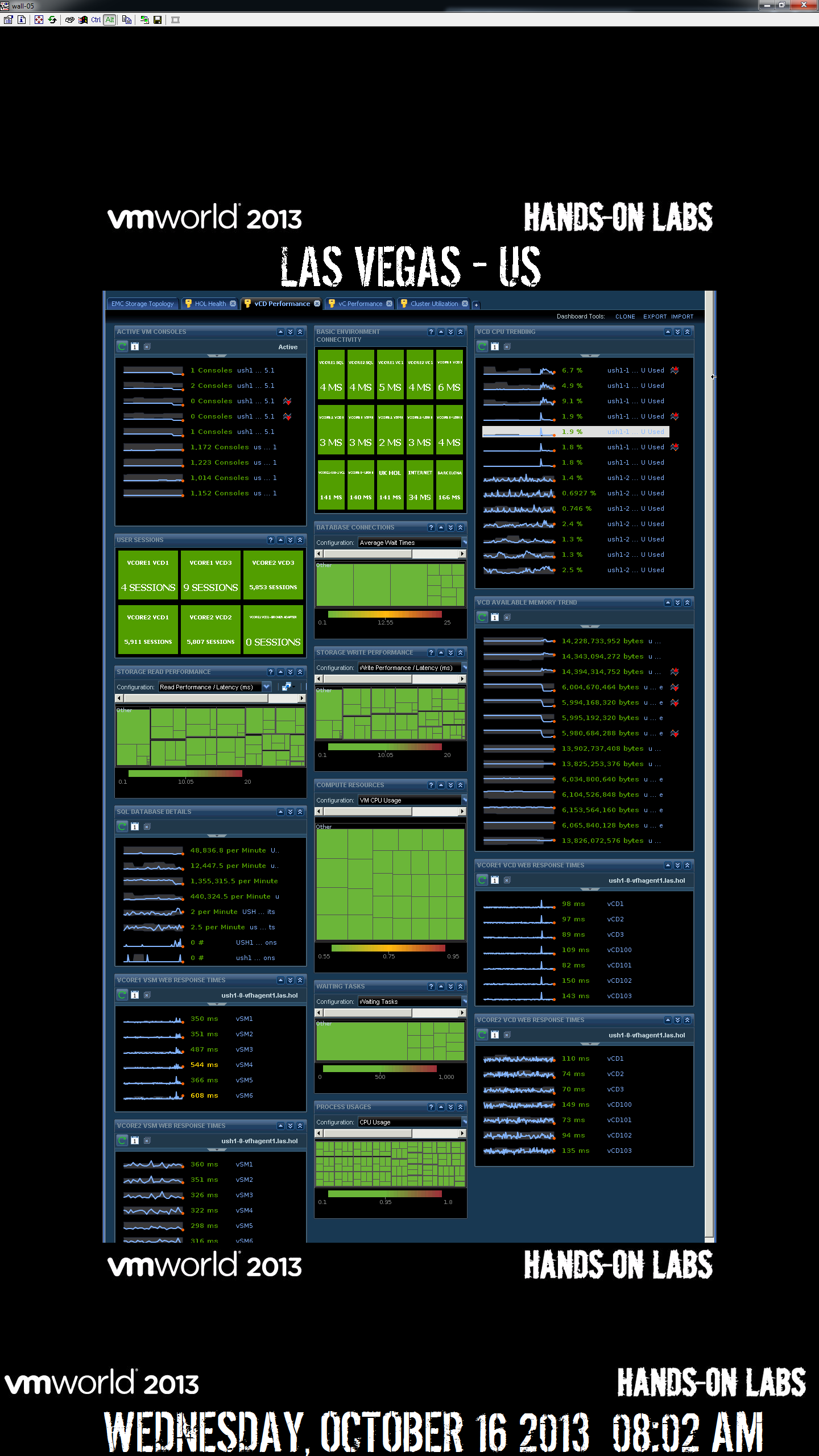
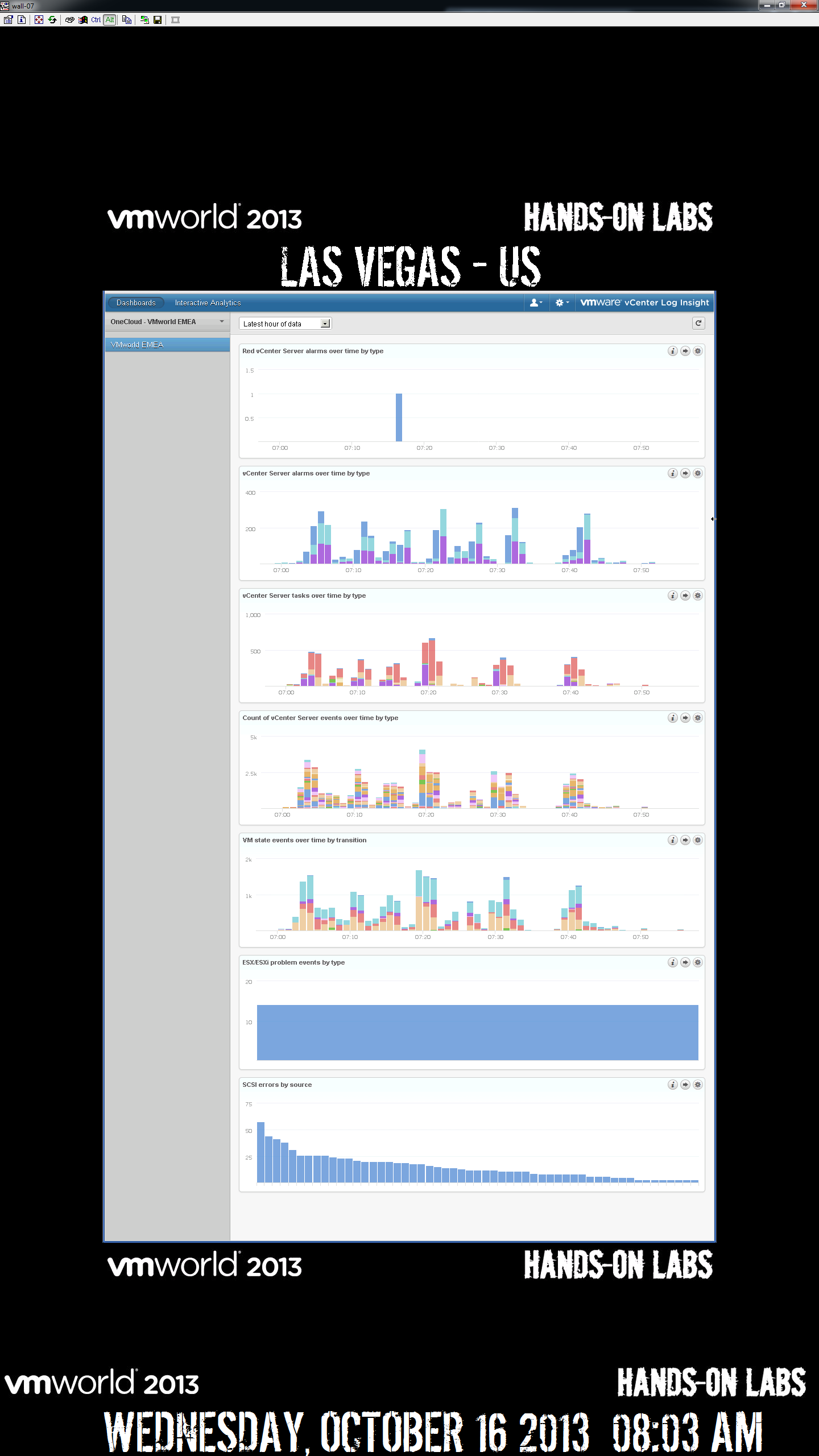
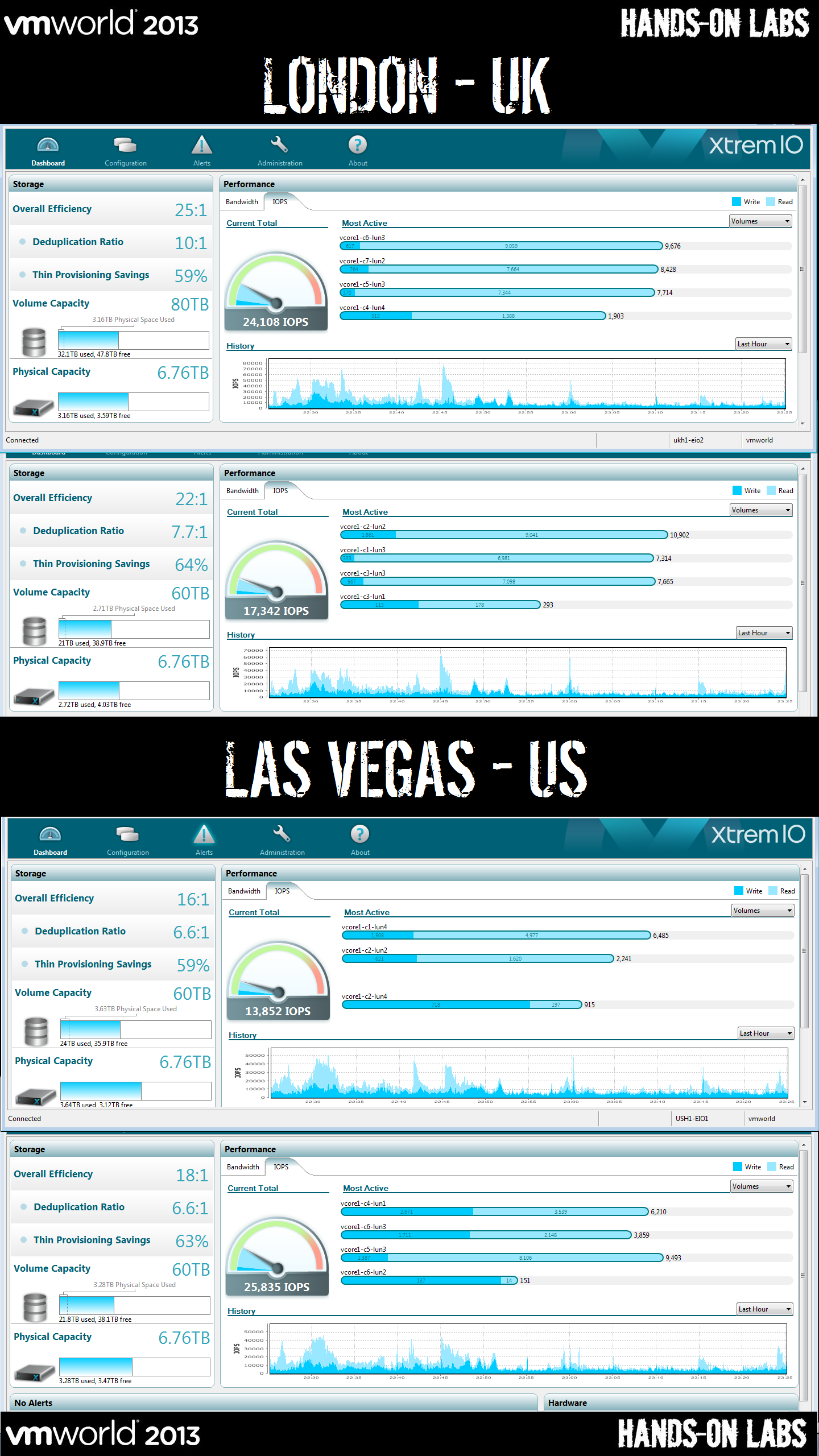
VMworld 2013 Hands On Labs Dashboards

I’ve been asked several times to publish these as not everyone got to take pictures, or they were not clear enough. 

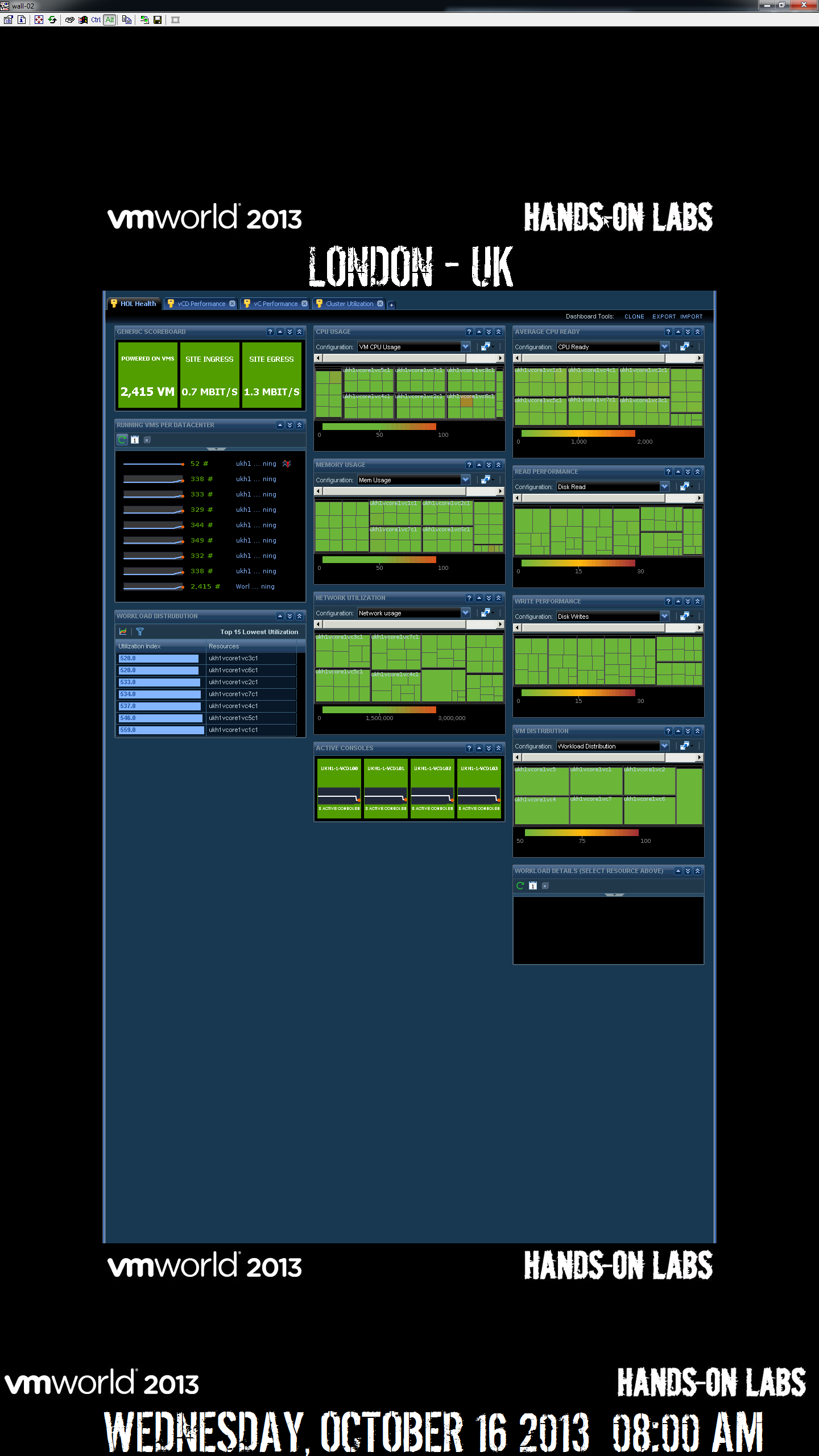
We chose to build custom VMware® vCenter™ Operations Management Suite™ (vC Ops) dashboards.  The Built-in vC Ops dashboards are build around a normal datacenter where workloads live indefinitely, and trending is key, for our environment, workloads are created and destroyed so frequently, that this data isn’t key.  Also in a normal environment, the VM’s are crucial, but in ours, the infrastructure is.

HOL was built with two major sites for each show.  For the EMEA VMworld, we used London & Las Vegas.  The dashboards below were taken right before the show opened in the morning, so there isn’t much if any load in London, there is some load in Las Vegas because that is where we were running the 24/7 public Hands on Labs.  The first dashboard for each site contains metrics around traditional constraints, such as CPU, Memory, Storage IOPS, Storage Usage, & Network Bandwidth.  These are all done at the vCenter level as the lab VM’s only live 90 minutes we really don’t care much about their individual performance as we can’t tune them before they are recycled.  We do care about the underlying infrastructure and we are watching to make sure they have plenty of every resource so that they can run optimally.   Much of the data that we fed into vC Ops comes from vCenter Hyperic

London1

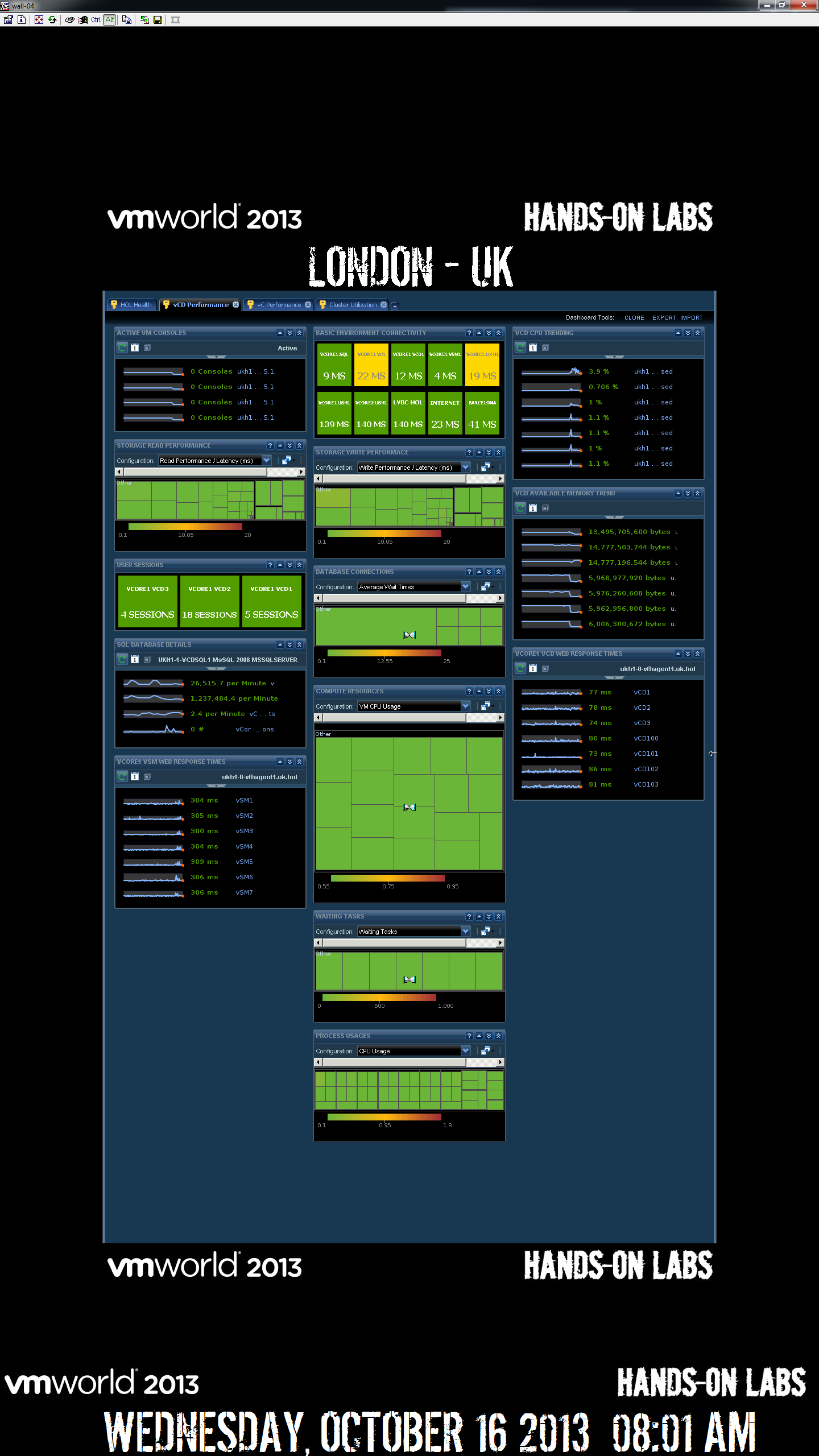
The second dashboard below is looking at vCloud Director Application performance.  We looked directly into inspecting each Cell Server for # of proxy connections, cpu, & memory.  We also looked  into the vSM to verify the health of the vShield Manager VM’s.  Lastly we were concerned with the SQL DB performance, so we were watching the transactional performance, making sure there wasn’t too many waiting tasks, or DB wait times.

London2

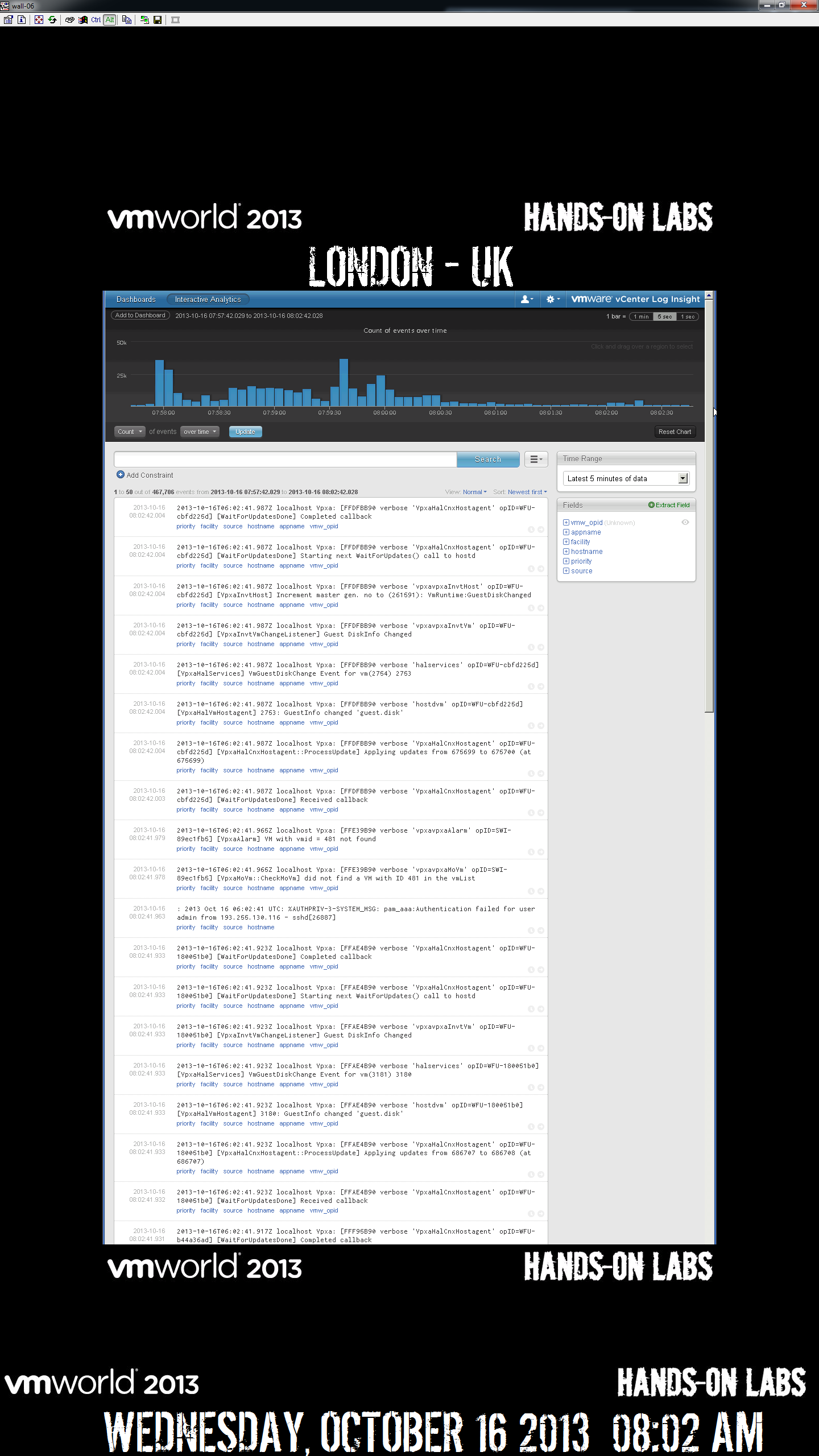
We also leveraged VMware vCenter Log Insight to consolidate our log views.  This was very helpful for troubleshooting to be able to trace something throughout the stack.  We also leveraged the alerting functionality to email us when known errors strings occurred in the logs so that we could be on top of any issue before users noticed.

london3

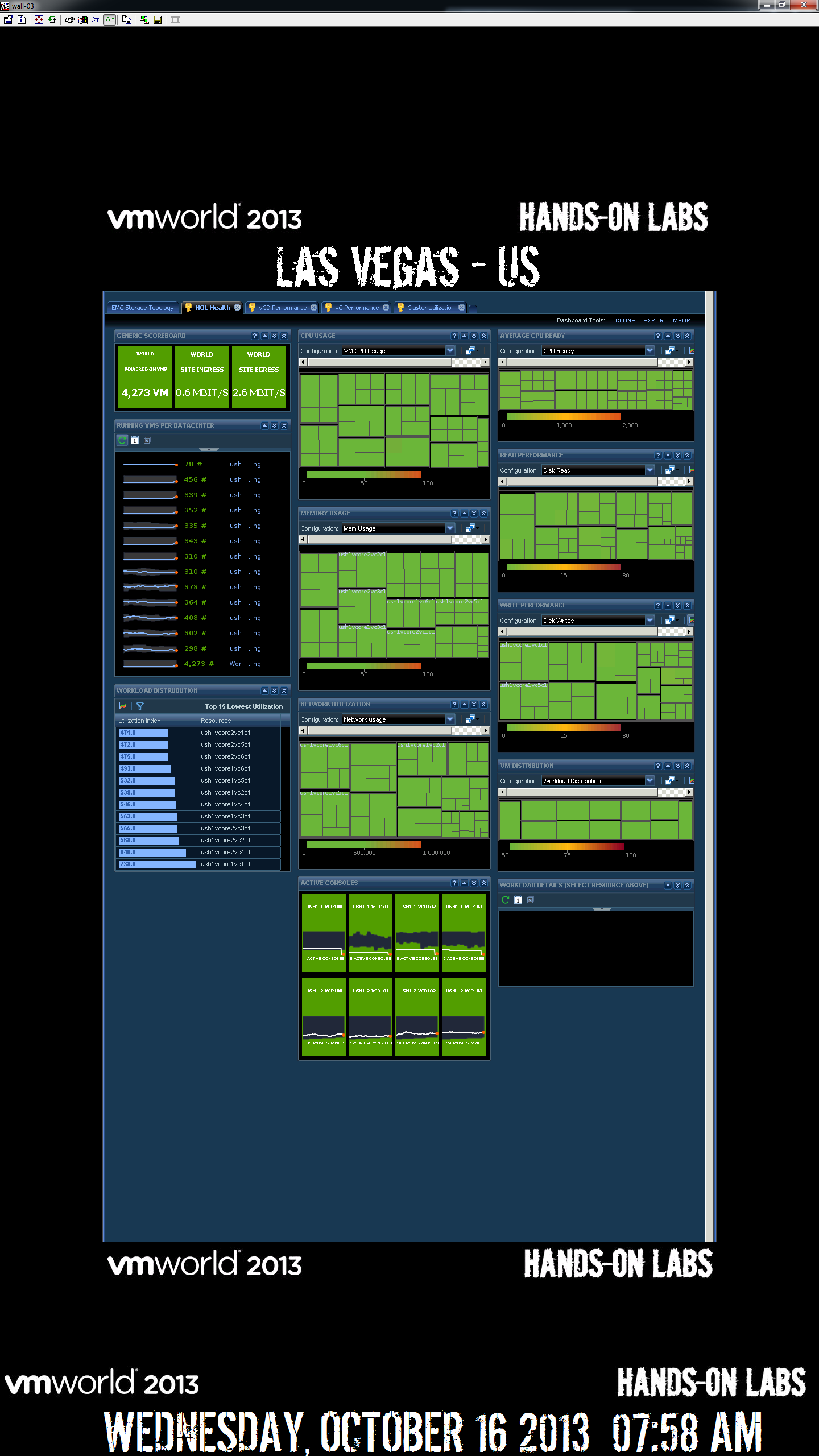
Same as Screen #1 above, just for Las Vegas, again you notice more boxes, that is because it is twice the size.  The London facility only ran the show, the Las Vegas DC below ran both the show and the public 24/7 Hands on Labs.

vegas1

Same as #2 Above.

vegas2

Same as #3 above, except that we show you the custom dashboard we created with VMware vCenter Log Insight, so that we could see trends of errors, this was very helpful to see when errors happen that we might otherwise not be looking for.

vegas3

The final dashboard below is to watch the EMC XtremIO performance.  These bricks had amazing performance and were able to handle any load we threw at it.  With the inline deduplication we were able to use only a few TB of real flash storage to provide 100’s of TB of allocated storage.  Matt Cowger from EMC did a great blog post about our usage

xio

Final Numbers:

HOL US served 9,597 Labs with 85,873 VM’s

HOL EMEA served 3,217 Labs with 36,305 VM’s.

We achieved a nearly perfect uptime.  We did have a physical blade failure, but HA kicked in and did it’s job, we also had a couple hard drive failures, once again a hot spare took over and automatically resolved the issue.  During both occurrences, we saw a red spike from the vC Ops dashboards, we observed the issue, but did not need to make any changes, we just watched the technology magically self-heal as it’s supposed to.

Wednesday, August 28, 2013

VMworld HOL using VCVA (vCenter Virtual Appliance)

This is the first of a series of HOL posts about "how we did it".

For the primary workload, we used the vCenter Virtual Appliance using the local Postgres database.

Due to the unusually high churn rate of HOL, we need to have a high ratio of vCenters.  These vCenters needed to have a lot of horsepower behind them to survive this churn.

1) Paravirtualized SCSI adaptors for disk controllers for the VCVA vm.
2) Created 2 additional dedicated datastores (Luns) for each of the DB & Logs on the VCVA vm.
3) 4 CPU's x 32GB memory (we might have gone a bit high on memory)
4) Removed all long term logging and rollups, we are doing all stats in vC Ops.
5) Increased heap sizes to large for the SPS, tomcat inventory & vCenter process.

The only downside to the VCVA is the fact that it doesn't support linked mode, but you can get around that with the NGC & SSO.   http://www.virtuallyghetto.com/2012/09/automatically-join-multiple-vcsa-51.html

ESXi 5.1vHost vDS ports on an stateless reverts to 512 after reboot

By default when you set the ports on hosts max to 1024, after reboot, it goes back to 512 on a stateless host. This is a known issue in the 5.1 release notes.
  • maxProxySwitchPorts setting not persistent after stateless host reboot 
  • The maximum number of ports on a host is reset to 512 after the host is rebooted and a host profile applied. When you set maxProxySwitchPorts on a specific stateless host on a distributed switch, the setting might not persist when the host is rebooted. This applies only to stateless hosts that are part of a distributed switch and have had themaxProxySwitchPorts setting changed.
  • Workaround: Manually change the maxProxySwitchPorts settings for the hosts after reboot.

There are 3 ways to make this change, i'll discuss them here.

1) vSphere Windows Client, this way seems to work, but does not.  The UI states that the host must be rebooted after the setting is changed. Some experimenting looked like the change did take effect immediately without a reboot and I've confirm in the API guide that a reboot is no longer needed for ESXi 5.1 hosts (http://pubs.vmware.com/vsphere-51/index.jsp?topic=%2Fcom.vmware.wssdk.apiref.doc%2Fvim.dvs.HostMember.ConfigSpec.html), so the "must reboot" label just a UI artifact.

2) Workaround stated above in the release notes using PowerCLI, While changing the maxProxySwitchPorts with PowerCLI does work, it's a pain. 

3) Using the NGC (next gen web client).  We found the workaround to be setting the "Default max number of ports per host" via the NGC and this does persist between reboots. We tested this on a host that we rebooted and it did come up with 1024 ports. 


The credit for this goes to my members, Jacob RossJoe Keegan.


Wednesday, July 3, 2013

vSphere 5.1 Update1 PSOD Fix Build

VMware released 5.1U1 on April 25th with Build 1065491.  There were some critical bugs identified and fixed, so if you are using 5.1U1 with Intel Processors, you may want to use build 1117900, which came out May 22nd.  This build fixes some bugs about occasional PSOD (purple screen of death) related Flex Priority in Intel processors (part of the VT featureset).  

Here is the Build KB http://kb.vmware.com/selfservice/microsites/search.do?language=en_US&cmd=displayKC&externalId=2051207

Download the Build http://www.vmware.com/patchmgr/findPatch.portal?product=ESXi+(Embedded+and+Installable)&version=121

Tuesday, July 2, 2013

Storage IOPS Planning


The limit on the VNX is the Storage Processors.  Utilizing the aggressive numbers is likely to see significant impact to the workloads.

Array Conservative Typical Aggressive
VNX7500 60,000 80,0000 100,000
S200 Isilon 8,000 (per node) 10,000 12,000